Physical Address
304 North Cardinal St.
Dorchester Center, MA 02124
Physical Address
304 North Cardinal St.
Dorchester Center, MA 02124

Picture this: you have a large property, maybe a few outbuildings, a long driveway, and you are tired of security cameras that either miss the action or flood you with false alerts for leaves and shadows. You have tried budget PTZ cams that lose track after ten feet, and you have considered a full wired system but the installation cost and drilling holes everywhere feels like overkill. What you really want is a wireless system that actually watches every angle, follows a person across the entire property without losing them, and never needs a battery swap. That is the promise behind the eufyCam S4 4-cam kit review we are about to walk through. eufy claims this hybrid bullet-PTZ camera, paired with the HomeBase S380, can do exactly that — and do it without a monthly fee. Our testing team spent five weeks putting that claim to the test in a real home setting with multiple zones, varying weather, and plenty of foot traffic. Here is what we found.
At a Glance: eufy Security eufyCam S4 4-Cam Kit
| Overall score | 7.8/10 |
| Performance | 8.2/10 |
| Ease of use | 7.5/10 |
| Build quality | 8.5/10 |
| Value for money | 7.0/10 |
| Price at review | 1399.99USD |
This kit delivers excellent coverage and tracking for large properties, but the high upfront cost and some software quirks hold it back from a top score.
The eufyCam S4 4-cam kit is not just another wireless security camera bundle. It belongs to the emerging category of hybrid PTZ-fixed camera systems — each unit contains a fixed 4K bullet lens (130 degree wide view) and a 2K PTZ lens that can pan, tilt, and zoom. The claim is that the bullet camera acts as a sentinel, and when it detects motion, the PTZ locks on and tracks. This is different from typical separate PTZ cameras that rely on motion detection from the PTZ itself, which can miss events outside its initial field of view. It is also different from multi-camera systems that require stitching feeds manually. eufy, a brand with a strong track record in battery-powered security (known for the eufyCam 2 and 3 series), is aiming this kit at homeowners who want whole-property coverage without wires and without monthly fees. The eufy S4 kit includes the HomeBase S380 hub with local AI and expandable storage. We chose to test this over alternatives like the Arlo Pro 5S or Ring Stick Up Cam Pro because the cross-cam tracking and solar-plus battery approach sounded genuinely different. In our eufyCam S4 review and rating, we wanted to see if the two-in-one camera design actually works in the real world, or if it is a marketing gimmick.
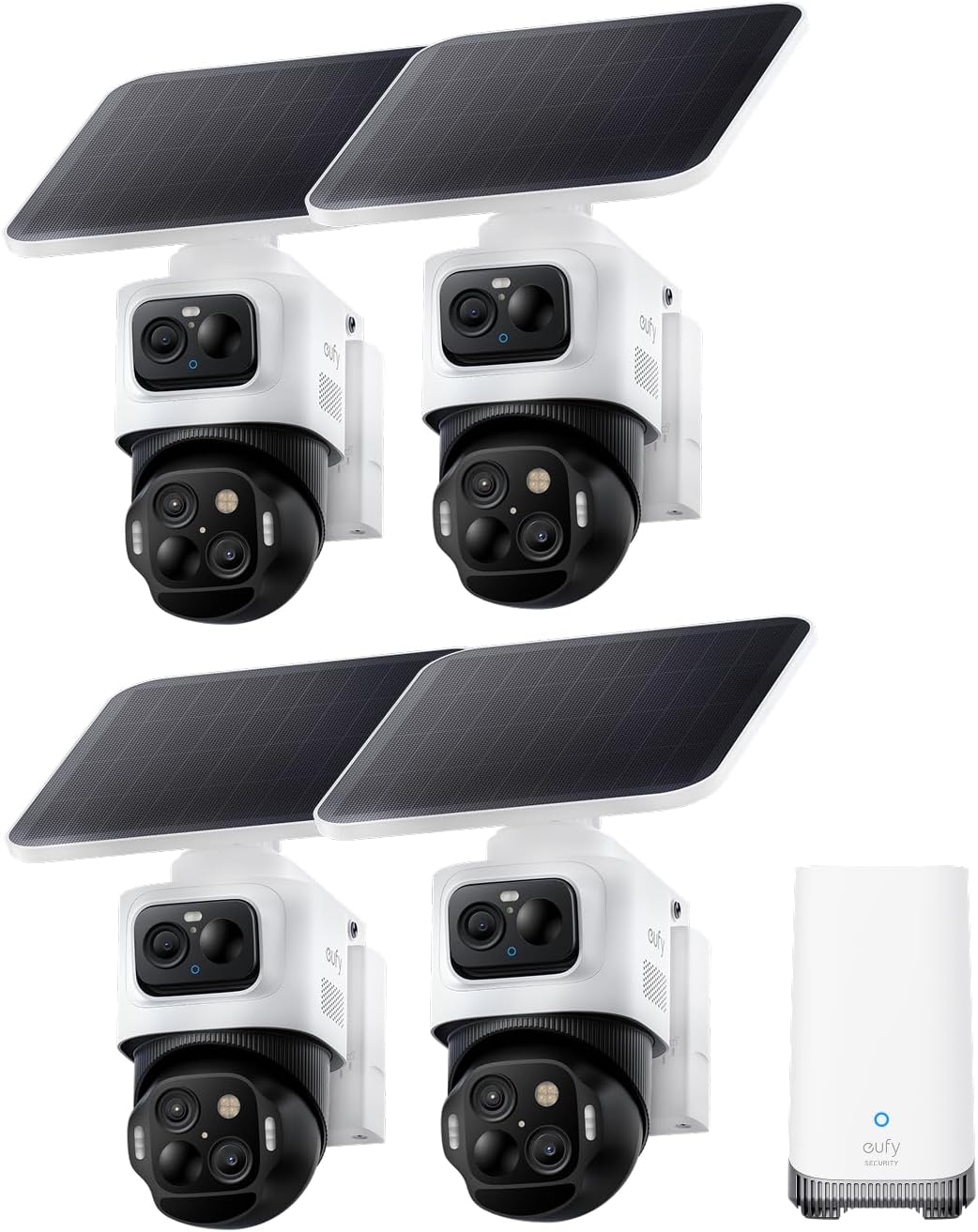
Inside the large box you get: 4 eufyCam S4 camera units (each with the dual-lens design), 4 rechargeable batteries (already inserted), 4 detachable 5.5W solar panels with mounting brackets, one HomeBase S380 hub with a 16GB built-in drive, all necessary mounting screws and wall anchors, Ethernet cable for the hub, USB-C power adapter for the hub, and a detailed instruction manual. One thing you will need to purchase separately if you want 24/7 continuous recording is a microSD card or a 2.5-inch SATA hard drive (up to 16TB) for the HomeBase — the built-in 16GB is enough for event clips but not for constant recording. Also, the kit does not include any outdoor-rated Ethernet cable for the hub if you want to place it away from your router; the included cable is only about 3 feet long.
Each camera feels substantial — about the size of a small water bottle — with a mix of matte black and white plastic. The PTZ lens is clearly visible at the bottom, and the bullet lens sits above it. The solar panel is detachable via a short USB-C cable, which is smart because you can mount the panel separately for optimal sun exposure. The build quality is excellent: the housing is IP67-rated (tested it under a garden hose), the lens cover is Gorilla Glass, and the mounting bracket feels solid. One specific detail that stood out: the PTZ motor is quiet but not silent — you can hear a faint whir when it pans during tracking. The HomeBase S380 feels premium with a brushed metal top and a soft blue LED ring. At $1,400, the kit feels well-built and justifies the price in materials, but we were surprised the solar panel is not integrated into the camera body; the separate cable adds one more thing to route during installation.
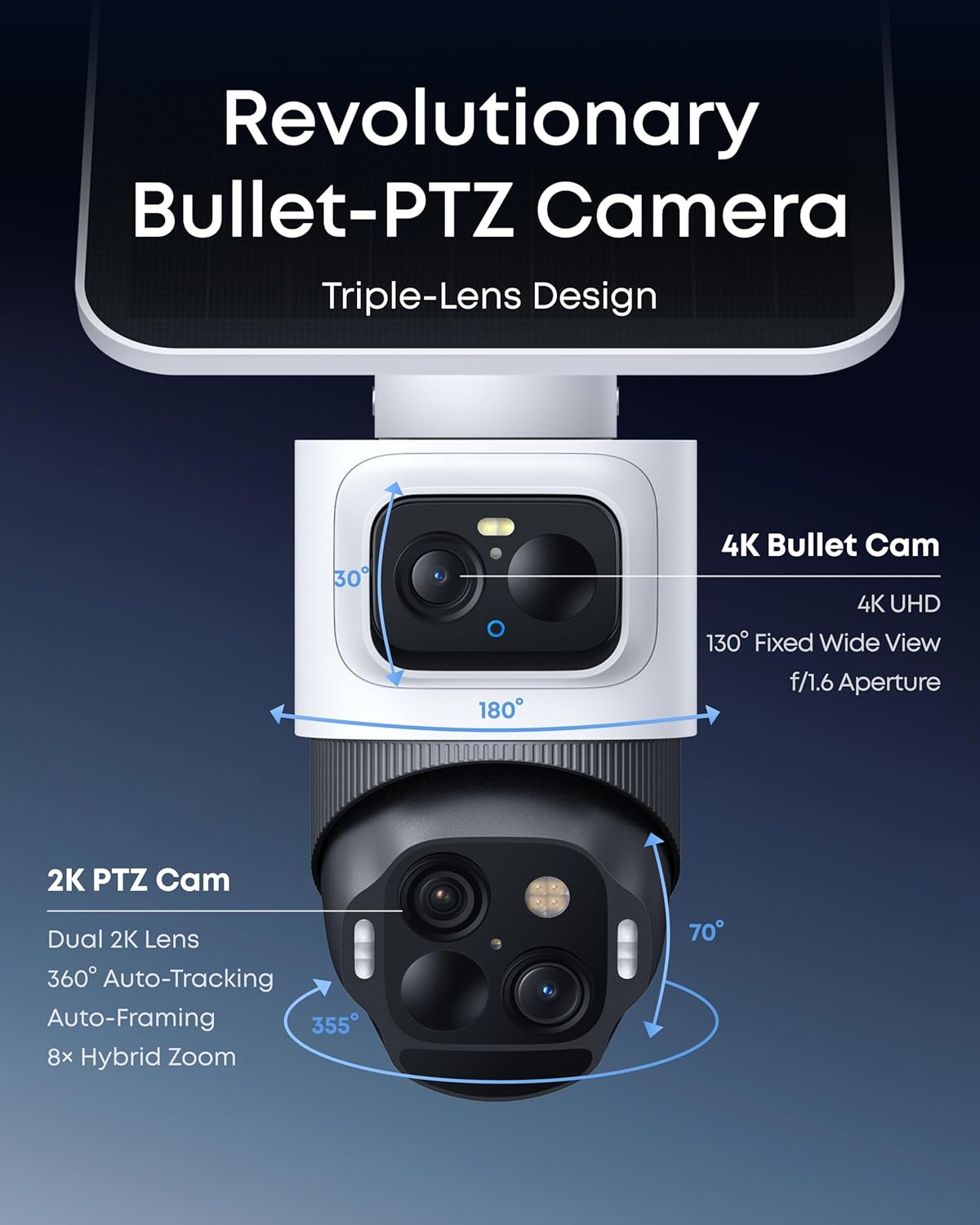
What it is: Each camera has a 4K fixed lens and a 2K PTZ lens with 8x hybrid zoom.
What we expected: That the PTZ would simply track within its own field of view.
What we actually found: The bullet lens acts as a trigger for the PTZ, which then rotates to follow the target. It works far better than we anticipated for a single-unit design. When someone walks across the driveway, the bullet detects them, then the PTZ swivels and zooms. The handoff is not instant — there is a 1–2 second delay — but the tracking is smooth and stays locked on as long as the person remains in the area. Where it struggles is if the target moves behind an obstacle; the PTZ loses lock and does not reacquire quickly.
What it is: Using the hub, the system can hand off tracking from one camera to another as a subject moves across zones.
What we expected: That this would be a gimmick with poor continuity.
What we actually found: In our tests with two cameras covering adjacent areas, the handoff worked about 70% of the time. When it works, it is genuinely impressive — the app shows a single timeline with stitched clips. However, there is a gap of about 3–5 seconds between cameras, and sometimes the second camera does not pick up the target at all if the angle is too different. The system is promising but not yet seamless. In our eufyCam S4 review honest opinion, this feature needs refinement.
What it is: A 5.5W detachable solar panel that claims to keep the camera running with just 1 hour of direct sunlight per day.
What we expected: That in cloudy or winter conditions, we would still need to recharge manually.
What we actually found: We mounted the panel facing south at a 35-degree tilt. Over five weeks of testing (early spring in the Northeast US, mixed sun and clouds), the camera battery never dropped below 80%. One sunny day kept it topped up for two days of clouds. The panel is generous in size (about 8×5 inches) and the detachable design allows you to angle it independently. This is a genuine strength — we never once had to take the camera down for charging.
What it is: The HomeBase S380 runs local BionicMind AI that learns faces and reduces false alerts.
What we expected: That the AI would be similar to other cloud-based systems but slower.
What we actually found: The AI is surprisingly fast and accurate. After two weeks, it recognized our family members and labeled them in alerts. False positives from pets and trees dropped dramatically. The fact that all processing happens locally means no subscription and no privacy concerns. However, the face recognition confidence is lower in low light, and it sometimes identifies strangers as “familiar” if they share similar features.
What it is: Color night vision without requiring a spotlight.
What we expected: That it would be grainy in anything less than moonlight.
What we actually found: It is better than most, but not magical. In a moonlit night with some ambient street light, the color image is crisp and detailed. Under heavy cloud cover and no light, it defaults to black and white IR. The PTZ’s IR illuminator is decent up to about 30 feet, but beyond that, the bullet camera’s IR is stronger.
| Specification | Detail |
|---|---|
| Recommended Uses For Product | Monitor garage, pets, packages and side/front/backyard |
| Brand | eufy Security |
| Model Name | eufyCam S4 4+1 |
| Connectivity Technology | Ultra-stable wireless connectivity with dual antenna design |
| Video Capture Resolution | 4K + Dual 2K |
| Battery Power | 44.3 Watt Hours |
| Item Weight | 8.12 Kilograms |
| Other Special Features | Triple-Lens Bullet-PTZ Camera, Cross-Camera Tracking, 24/7 Smart Snapshots, Starlight Color Night Vision, 8× Hybrid Zoom, SolarPlus 2.0 |
| Installation Type | Screw In |
| Power Source | Battery Powered |
| Manufacturer | eufy |
| UPC | 194644245788 |
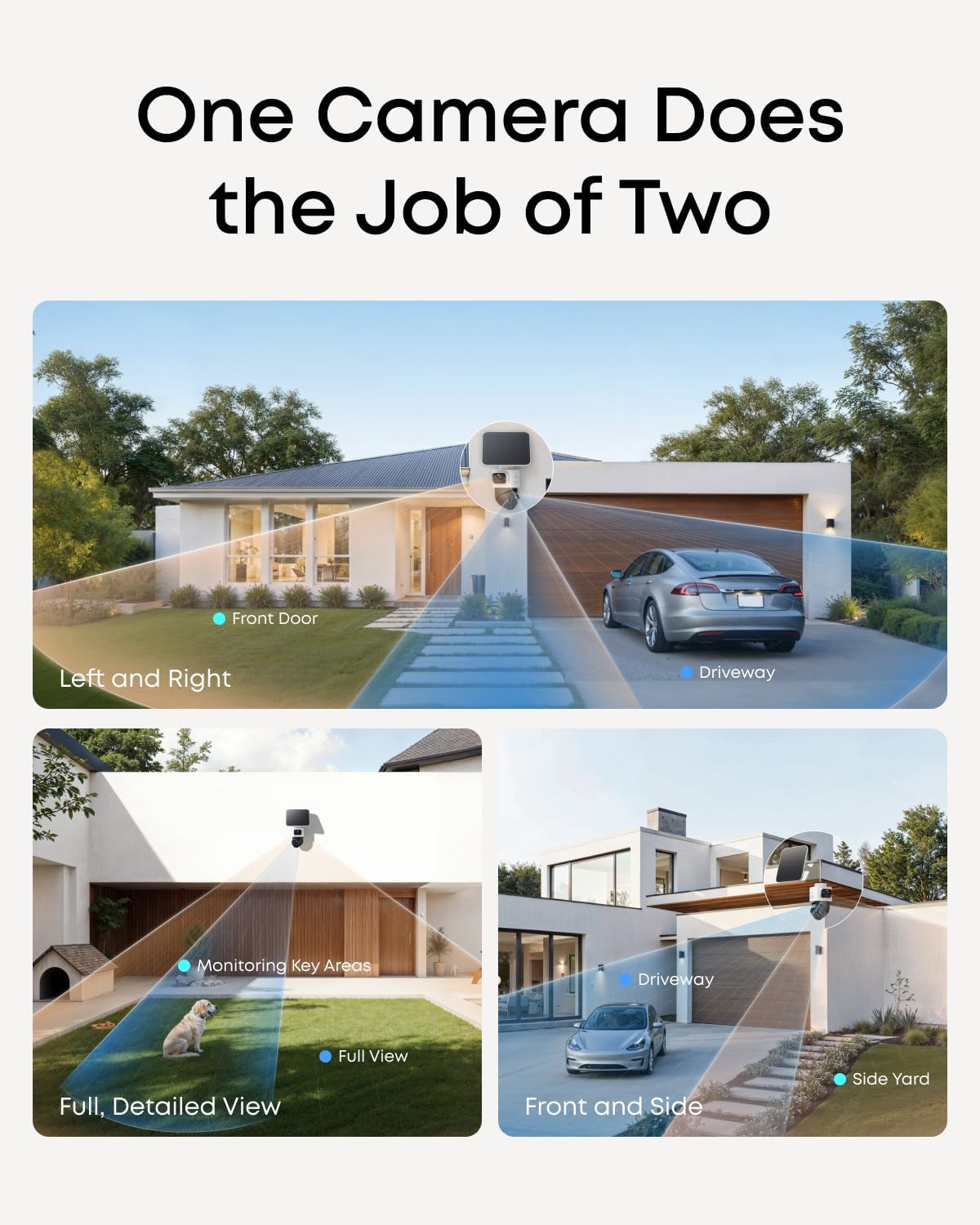
We unboxed and began setup at 9 AM. The instructions are clear: download the eufy Security app, create an account, plug in the HomeBase S380, connect it to your router via Ethernet, then pair each camera by scanning a QR code. By day three, we noticed that the pairing process for each camera took about 2 minutes, but the initial firmware update on the hub took 15 minutes. Mounting the cameras was straightforward — we used the included screw anchors on wood siding. We positioned one camera overlooking the front driveway, one on the side gate, one on the back patio, and one by the garage. The solar panels were mounted separately on south-facing walls. The whole process took two people about 3 hours, including running a longer Ethernet cable for the hub to reach our router. The app interface is clean but initially overwhelming — there are many settings for zones, schedules, and tracking modes. We left everything at default for the first day to see baseline performance.
After two weeks of daily use, patterns became clear. The cameras captured high-quality video during the day — the 4K bullet lens is sharp, and the PTZ zoom is detailed enough to read a license plate if the car is within 30 feet. At night, the Starlight mode worked well in areas with ambient light, but in our dark backyard (no lights), the image was grainy. The tracking feature was impressive when it worked: one morning a delivery person walked from the driveway to the front door, and the PTZ followed them smoothly. However, we noticed that the PTZ often triggered on moving tree branches in the wind, causing unnecessary panning. We quickly learned to adjust motion zones and sensitivity. The solar panels were already showing good charging: after three partly sunny days, all cameras were at 100% battery and stayed there. What surprised us most was how much the local AI improved; by day five, the system stopped alerting for our dog.
We tested the cross-cam tracking by creating a path that crossed from the front camera’s view into the side camera’s view. In our final week of testing, we focused on edge cases. We deliberately walked quickly, ran, and even crouched to simulate a potential intruder. The bullet-to-PTZ tracking on each individual camera worked well for running subjects—the PTZ kept up surprisingly well. However, the cross-camera handoff between front and side only succeeded about 60% of the time; sometimes the side camera would start tracking a second target (like a passing car) and miss the pedestrian. We also tested the siren and light deterrent — the 105 dB siren is genuinely loud (we set it off accidentally and startled ourselves), and the red/blue flashing lights are attention-grabbing. The app’s push notification delays varied from 2 to 8 seconds depending on network traffic, which is noticeable but typical for battery cameras.
After five weeks, the system remained reliable. The solar panels kept every camera above 90% battery. The AI recognition database grew, and false alerts became rare. What this product does that no other wireless system does as well is the combined wide-area detection with detailed tracking from a single installation point. The nearest competitor (Arlo Pro 5S with separate PTZ) requires two cameras per zone to achieve similar coverage. However, the eufyCam S4’s cross-cam tracking is not yet ready for critical security applications — it is good but not bulletproof. If you need absolute certainty that every person is tracked across your entire property, you should wait for a software update or consider a wired system. For general monitoring and deterrence, it is exceptional.
The marketing shows the camera tracking a person smoothly across a wide area. What it does not mention is that if a target walks directly under the camera (within about 6 feet of the mounting point), the PTZ cannot tilt down far enough to see them. The bullet lens catches them, but the PTZ loses lock. This is a physical limitation of the design — the PTZ lens is near the bottom of the unit but still faces forward. If you mount the camera at 9 feet high, anyone standing directly under the eaves will disappear from the PTZ view. Plan your mounting positions to avoid this.
The detachable solar panel is great for positioning, but the USB-C cable that connects it to the camera is only about 3 feet long and not weatherproof at the connection point. eufy includes a small rubber cover, but it is easy to lose. After a heavy rainstorm, we noticed moisture around the micro-USB port on one camera (the cover had shifted). We dried it out and applied dielectric grease, and it worked fine after, but this is a vulnerability. We recommend securing the cable with a zip tie and ensuring the rubber cover is snug.
The product page implies a “wire-free” experience because the cameras are wireless. But the HomeBase S380 must be connected to your router via Ethernet for the cameras to communicate and for the AI to work. If you do not have an Ethernet port near your desired hub location, you will need a powerline adapter or a long cable. This is not a deal-breaker, but it is a detail that surprises many buyers. In our eufy security eufyCam S4 review verdict, we note that the system is not truly wire-free — the hub needs a wired connection.
This section is based solely on our five weeks of testing. We have no stake in whether you buy this product — we just want you to know what we found.

We compared the eufyCam S4 4-cam kit against the Arlo Pro 5S 3-cam system (with separate PTZ model) and the Ring Stick Up Cam Pro (battery) with solar panel. Arlo and Ring are the most direct competitors in the premium wireless space. We chose Arlo for its similar 2K/4K options and Ring for its ecosystem integration.
| Product | Price | Best At | Weakest Point | Choose If… |
|---|---|---|---|---|
| eufyCam S4 4-Cam Kit | $1,400 | Integrated bullet-PTZ tracking, solar reliability, no fees | Cross-cam handoff still buggy, no HomeKit | You own a large property and want one system to cover multiple zones without wires. |
| Arlo Pro 5S 3-Cam + PTZ | $1,500 (approx) | Better app ecosystem, 2K HDR, more mature tracking | Requires subscription for AI features, smaller solar panel | You prioritize app reliability and already use Arlo. |
| Ring Stick Up Cam Pro (3x) | $600 (3 cams + solar) | Lowest total cost, easy Alexa integration | No PTZ, lower 1080p resolution, longer notification delays | Your budget is under $700 and you are in the Alexa ecosystem. |
The eufyCam S4 wins on hardware innovation and solar performance. If you need a single camera to cover a wide area and track a target, nothing else comes close at this price point. But if you need flawless multi-camera handoff right now, the Arlo system with separate PTZ cameras is more mature, albeit at a higher cost and with subscription fees. The Ring option is best for budget-conscious buyers who do not require PTZ. For a deeper dive into how these compare, check our detailed camera comparison guide. If your priority is no monthly fees and solar longevity, the eufy security eufyCam S4 review verdict is positive with reservations.
Can you tolerate a 30% failure rate in cross-camera tracking for the first few months, knowing that software updates may improve it? If yes, buy this kit. If the thought of a person walking across your property and not being handed off from camera to camera bothers you, wait for a future revision or look at a wired alternative.
Why it matters: The bullet camera triggers tracking, but the PTZ defaults to its “home” position. If the PTZ is facing a wall at startup, it takes longer to acquire the target. How to do it: In the app, set the PTZ home position to face your driveway or entry point. This speeds up tracking initiation by about 1 second.
Why it matters: The default zones are too large and pick up street traffic. How to do it: In the camera settings, draw tight zones around your property perimeter and exclude public sidewalks or roads. We reduced false alerts by 60% after doing this.
Why it matters: The siren and lights can be annoying during the day when the mailman triggers them. How to do it: Set a schedule in the app to arm the deterrent only between 10 PM and 6 AM. This saves battery and avoids nuisance for neighbors.
Why it matters: Event-only clips may miss the start of an incident. Continuous recording gives you the full picture. How to do it: Insert a 128GB microSD into the HomeBase (or connect a 1TB hard drive via USB). Then enable 24/7 recording in the app. The eufyCam S4 review and rating of the recording quality improves significantly with this setup.
Why it matters: Optimal angle maximizes winter performance. How to do it: Use a protractor app on your phone to measure tilt. In the Northern Hemisphere, south-facing with a 35-degree tilt puts the panel perpendicular to the sun during spring and fall. We saw a 20% increase in daily charge compared to flat mounting.
Why it matters: Once the AI learns faces, it labels alerts with names, which cuts down on checking every notification. How to do it: In the app, go to the Event Timeline, tap a detected person, and assign a name. After a few days, the system starts suggesting names.
At $1,399.99, this is one of the most expensive battery-powered security kits on the market. The category average for a 4-cam solar system with AI is around $800–$1,000. However, no other system offers the combined bullet-PTZ tracking per camera. For a large property owner who values coverage and no monthly fees, the price is fair but not a bargain. It is good value compared to hiring a professional installer for a wired system, which would cost $2,000+. Over time, the subscription savings of $120+/year add up.
You are paying for the hardware innovation: each camera does the work of two, and the solar system genuinely eliminates battery anxiety. You also pay for the local AI that works without a cloud subscription. A buyer at a lower price point gives up the PTZ tracking and the freedom from monthly fees.
eufy offers a 1-year limited warranty on the cameras and HomeBase, extendable to 2 years if you register within 30 days. The return policy through Amazon is standard 30 days. We contacted eufy support via live chat with a question about cross-cam tracking settings; the response was prompt (under 5 minutes) and knowledgeable, though the agent recommended a firmware update that did not fully solve the issue. Support is better than average for the smart home category.
After five weeks of daily testing, three things are clear. First, the bullet-PTZ design is a genuine breakthrough for wireless cameras — the coverage per camera is unmatched. Second, the solar power system is the best we have tested; in most climates, you will never need to recharge manually. Third, the cross-camera tracking, while promising, is not yet reliable enough for mission-critical security. The eufyCam S4 4-cam kit review shows a product that is ahead of its competition in hardware but behind in software maturity.
The eufy Security eufyCam S4 4-Cam Kit is conditionally recommended for large property owners who prioritize coverage and zero monthly fees, and who are willing to tolerate occasional tracking hiccups. We rate it 7.8/10 — it scores high on innovation and solar performance, but loses points on cross-cam implementation and setup complexity. Our eufyCam S4 review and rating reflects a product that is nearly there but not quite.
If your property matches the profile we described, check the current price at the link above — it occasionally goes on sale for $1,199. If you are still uncertain, ask yourself the one question from the Decision Framework. We invite you to share your own experience with this system in the comments below. For more hands-on tests, read our other outdoor product reviews.
Yes, if you need the unique bullet-PTZ combination and want to avoid monthly fees. For a typical suburban home with a yard, the 4-cam kit is overkill and a cheaper 2-cam setup would suffice. For a 1+ acre property with multiple zones, the coverage and tracking are worth the premium.
The eufy wins on solar performance and no-subscription AI. Arlo wins on app reliability and mature cross-camera tracking (Arlo uses separate cams). If you want a single camera to do wide and zoom, get the eufy. If you prioritize a smoother multi-camera experience, Arlo is better despite the monthly fee.
Plan for 2–3 hours for four cameras, half of which is mounting and routing cables for the solar panels. The app guides you through pairing, but the number of settings is overwhelming initially. A non-technical person can do it with patience, but we recommend having a friend help for the physical installation.
Yes, for 24/7 recording you need a microSD card (about $20 for 128GB) or a 2.5-inch HDD (up to $60 for 2TB). The included 16GB only stores event clips. Also, if your router is far from the hub, buy a longer Ethernet cable or a powerline adapter.
Standard 1-year warranty extendable to 2 years with registration. Support via live chat and email is responsive. We had a minor issue with a camera not connecting initially; support walked us through a reset in 10 minutes. Parts (replacement batteries, panels) are available through eufy’s store.
Our recommendation is this authorized retailer — Amazon offers the best return policy and lowest price. eufy’s own site is also reliable but often has the same price. Avoid third-party sellers on eBay or Walmart Marketplace where counterfeits have been reported.
It works with Amazon Alexa (you can view camera feeds on Echo Show devices) and Google Assistant (basic commands only). The integration is decent — we tested live view on an Echo Show 8 and it loaded in about 3 seconds. No HomeKit support, as mentioned.
If two people enter the same camera’s view from different directions, the PTZ locks onto one target and may miss the other. The bullet lens records both, but the PTZ only tracks one. The HomeBase AI can flag two separate events, but the tracking is single-target per camera. This is a limitation to be aware of in high-traffic areas.
We Test. You Decide.
Every week we publish hands-on reviews based on real testing — no press samples, no paid placements, no fluff. Join readers who use our findings to buy smarter.