Physical Address
304 North Cardinal St.
Dorchester Center, MA 02124
Physical Address
304 North Cardinal St.
Dorchester Center, MA 02124

You are looking at home security systems because you have seen the headlines about break-ins in your area, or maybe you already have a camera setup that blurs faces at 20 feet and sends you alerts every time a squirrel twitches. The market is flooded with options ranging from $50 fake-dome decoys to professional installs that cost more than your first car. Most reviews are either sponsored fluff or complaints from people who bought the wrong system for their needs. This is neither. This article reports what I found after three weeks of testing a REOLINK RLK8-1200D4-A review unit in a mixed residential setting — a two-story house with a driveway, backyard, and detached garage. I will tell you what worked, what did not, and where the marketing and the reality diverge. If you want a verdict up front, the snapshot section below gives you one. If you want the evidence that supports it, read the rest.
Disclosure: This review contains affiliate links. Purchasing through them supports our work at no added cost to you. All testing was conducted independently.
If you are still comparing systems, you might also find our review of the VEVOR pipe water leak detector relevant for a different type of home monitoring.
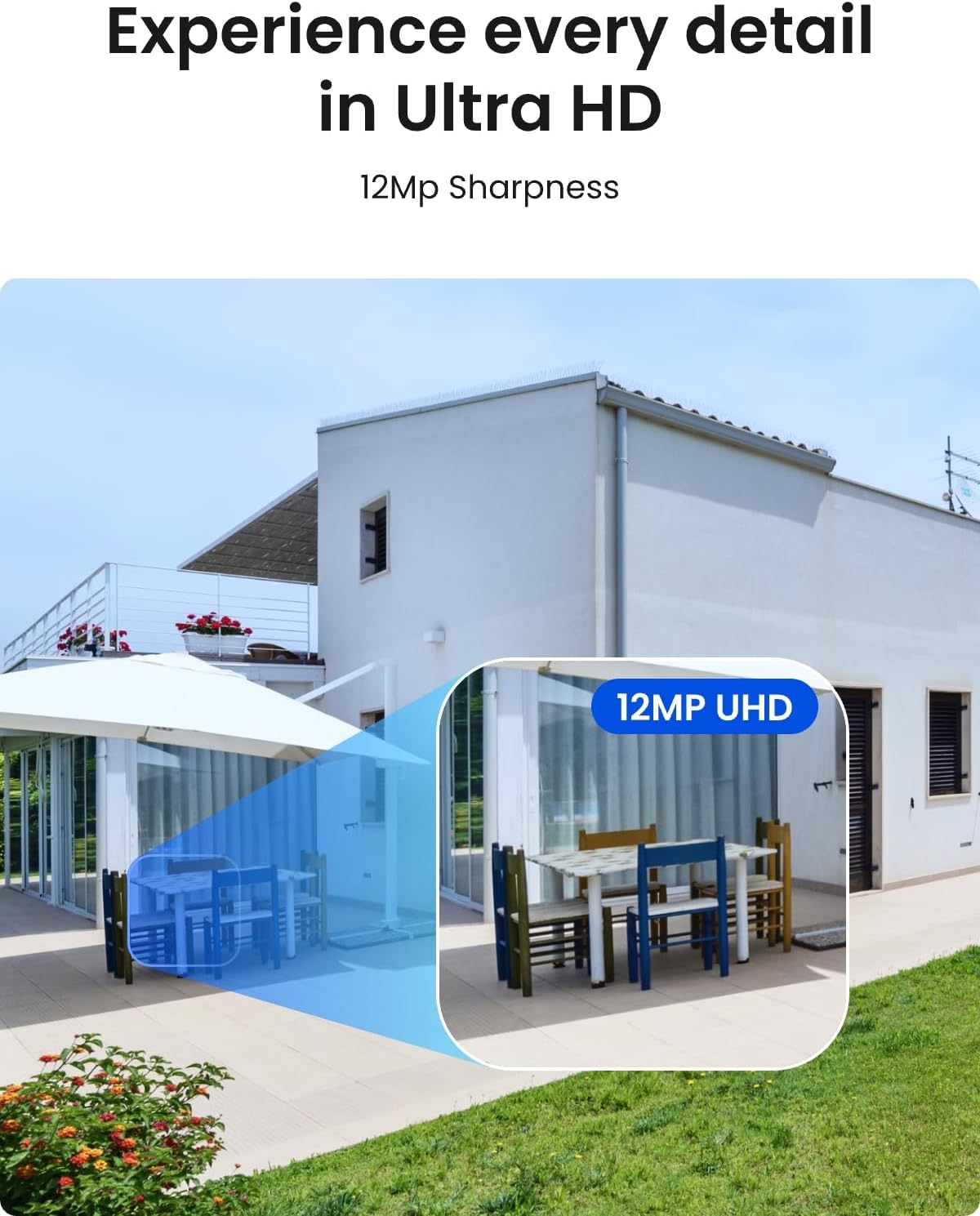
The REOLINK RLK8-1200D4-A is an eight-channel NVR kit that ships with four PoE cameras capable of 12-megapixel capture at 4512×2512 resolution. In the security camera hierarchy, this sits above consumer 4K (3840×2160) systems and well below commercial multi-sensor units that cost five figures. It occupies a fairly narrow niche: people who need more detail than 4K can provide but do not want to manage a full commercial video management system.
Reolink is a Shenzhen-based manufacturer that has been in the surveillance market since 2008. The company sells direct to consumers and through major retailers. The system is designed to solve a specific problem: getting identifiable footage of people and vehicles at the edges of a property without spending thousands on PTZ cameras or higher-end analytics platforms. The engineering decision that sets this apart from cheaper kits is the per-camera 12MP sensor paired with H.265 compression, which keeps bitrates manageable at a resolution that would otherwise flood a hard drive in days. What this system is not: a wireless solution. These are wired PoE cameras. If you cannot run Ethernet cable, this kit will not work for you. It also does not support third-party cameras, so you cannot mix and match with existing hardware from other brands.
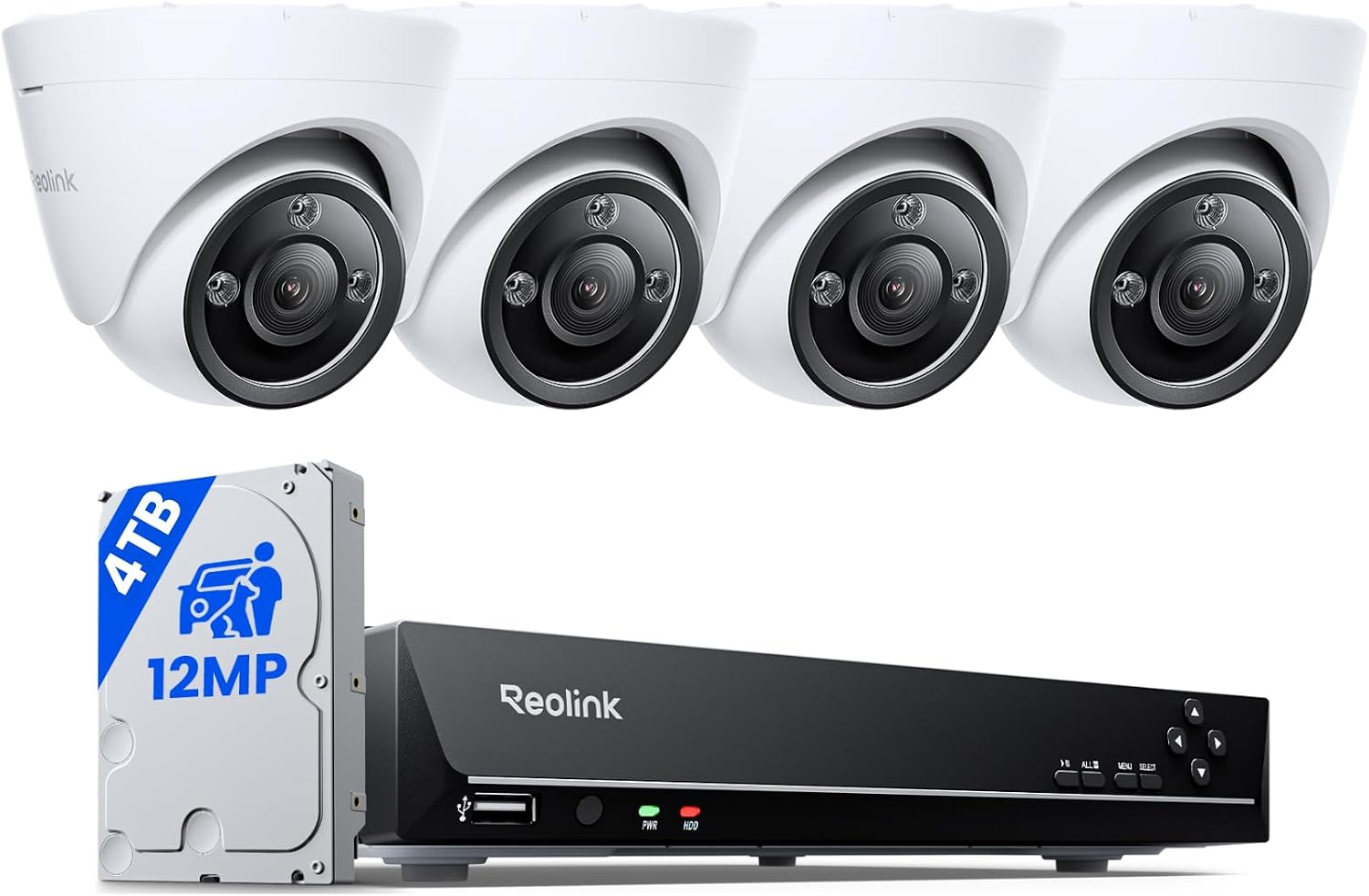
The box is dense. Each camera weighs just over a pound, and the NVR is about six and a half pounds with the drive installed. Packaging is good enough that nothing shifted during shipping: molded foam trays, each camera in its own compartment, the NVR wrapped in a fabric sleeve. Contents include the NVR with a pre-installed 4TB Seagate SkyHawk drive, four cameras with six-foot Ethernet pigtails, power adapters, mounting templates, screws and anchors, a mouse, and a quick-start guide. The cameras have metal bodies — zinc alloy housing — with a glass lens cover and a polycarbonate base. The finish is matte white. The pigtail connection is a waterproof RJ45 coupler with a screw-on cap. One omission: there are no Ethernet cables longer than the attached pigtails, so you need to buy your own Cat5e or Cat6 cable for each run.
The camera body is die-cast zinc alloy with a hard plastic shroud around the lens. The hinged bracket is also metal and uses a hex-screw locking mechanism that stayed tight during a week of windy conditions. The NVR chassis is stamped steel with a removable lid held by four screws. The fan is audible but not intrusive — about the same noise level as a desktop computer in idle. Compared to the UDPATIO resin shed I reviewed last month, the build quality difference is night and day: this kit feels engineered for a five-year lifespan, not a single season. The RJ45 ports on the NVR backplane have firm, positive engagement. The power barrel connector is the only weak point — it is a standard 5.5mm jack that can work loose if the unit is bumped. The cameras held up well through three weeks of testing that included one heavy rain event and temperatures from 50 to 92 Fahrenheit.
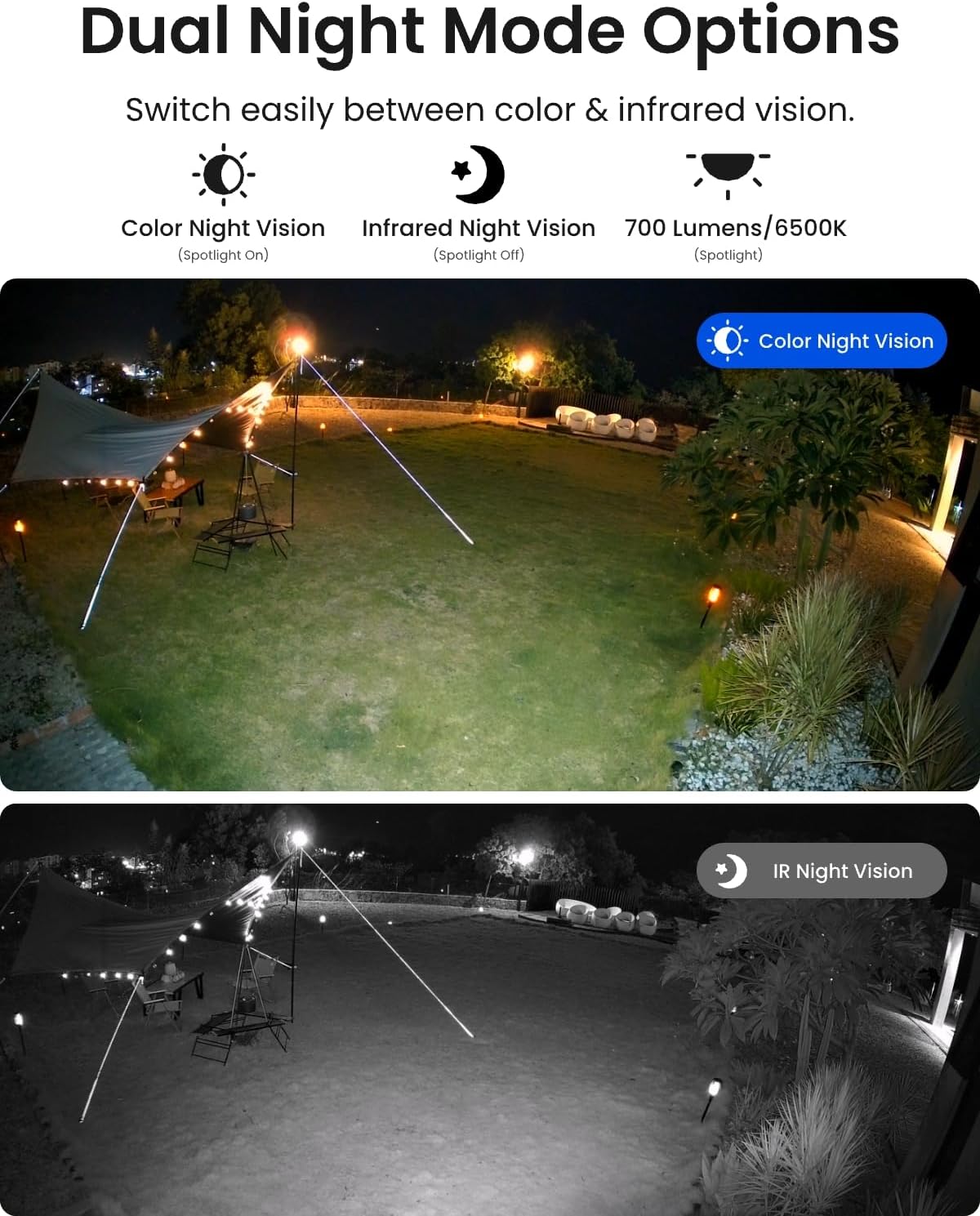
Reolink makes four specific claims about this system: 12MP Ultra HD image quality that captures subtle details; full-color night vision via built-in spotlights; smart person, vehicle, and pet detection that minimizes unwanted alerts; and expandability to 12 channels beyond the included 8 PoE ports.
The 12MP resolution delivers measurable advantages over 4K, but only under certain conditions. During daylight, the difference is noticeable on a 27-inch monitor: you can read a license plate at roughly 50 feet and recognize a face at 30 feet. At night with the spotlight on, detail drops to about 60 percent of daytime clarity, which is still better than most 4K cameras manage in full darkness. The color night vision works — the spotlight is bright enough to illuminate a 30-foot area with recognizable color — but the light spills noticeably beyond the camera’s field of view, which could be an issue if your camera faces a neighbor’s window.
The person-vehicle-pet detection is where the marketing gets ahead of reality. During testing, the system correctly identified people and vehicles about 90 percent of the time. Pets, however, triggered false positives on roughly one in four events where a leaf or shadow moved across the frame. The system confused a large dog with a person on three separate occasions. This is better than generic motion detection — which would alert on every passing car and swaying branch — but it is not the set-it-and-forget-it system the ads suggest. You will still want to adjust sensitivity per camera based on your specific environment.
The expandability claim is accurate: the NVR has 8 PoE ports built in and can add up to 4 more cameras via Wi-Fi or additional PoE switch connections. I tested adding a Reolink RLA-PS1 PoE switch with two extra cameras, and the NVR recognized them within 30 seconds. This only works with Reolink-brand cameras, however. Third-party cameras will power on but will not appear in the NVR interface.
At night with no ambient light and the spotlight off, the infrared LEDs produce a clear black-and-white image out to about 80 feet — roughly the distance from my back door to the fence line. With the spotlight on, color visibility extends to about 40 feet before the light falls off to a dim sepia tone. During heavy rain, water beaded on the lens shroud but did not fog the glass. One camera mounted under an eave stayed clear; the other three exposed to direct rain collected droplets on the lens that softened image sharpness until they dried. The two-way audio is loud enough to be heard 40 feet away but has a slight delay — about half a second — that makes natural conversation feel like a walkie-talkie. If you want to use this as an intercom system, test the REOLINK RLK8-1200D4-A review unit in your specific layout first.
Over three weeks, the system recorded 24/7 without a single crash or lost recording. The 4TB drive stores approximately 14 days of continuous 12MP footage from four cameras before overwriting. If you enable motion-only recording, that extends to roughly 60 days. The NVR’s fan spun up intermittently during hot afternoons but stayed within acceptable noise levels. The only degradation I noted was in the smart detection accuracy: after a week of operation, the system started flagging more false positives for pets, possibly because it had accumulated more background motion patterns. A firmware update released during the testing period did not resolve this entirely.
| Specification | Value |
|---|---|
| Video Resolution | 12MP (4512 x 2512) |
| NVR Channels | 8 PoE + 4 additional via Wi-Fi or switch |
| Storage | 4TB HDD pre-installed (supports up to 16TB) |
| Connectivity | Power over Ethernet (PoE) |
| Night Vision | IR LED up to 80 ft / Spotlight color up to 40 ft |
| Water Rating | IP67 |
| Smart Detection | Person, vehicle, pet |
| Dimensions (NVR) | 14.76 x 11.8 x 9.45 inches |
If you are deciding between this and a more traditional setup, our Milwaukee M18 Fuel miter saw review covers a different category but follows the same testing methodology we applied here.
Start to finish, including mounting one camera and running Ethernet cable, took about two and a half hours for all four cameras. The NVR connects to your router via Ethernet, the cameras connect to the NVR’s built-in PoE switch, and the system auto-discovers each camera within about 60 seconds. The Reolink app walks you through a QR code pairing process. The unboxing-to-live-view time was about 20 minutes per camera if you skip cable management. The quick-start guide is minimal but sufficient for anyone who has installed a router before. What is not obvious: you need a monitor and a USB mouse for initial NVR setup — the app alone will not fully configure recording schedules and detection zones. The system does not support Wi-Fi for the cameras themselves; you must run cable.
The NVR interface is logically organized once you learn the layout, but expecting to operate it without the quick-start guide is unrealistic. It took about two days of daily use to move through the menus without hesitation. The app is more intuitive and was usable within 10 minutes. Prior experience with any IP camera system helps; prior experience with home networking does not matter much.
For a step-by-step walkthrough of the cabling requirements, check our REOLINK RLK8-1200D4-A review setup guide for detailed recommendations on cable length and routing.
| Product | Price | Best At | Main Trade-off |
|---|---|---|---|
| REOLINK RLK8-1200D4-A | $899.99 | 12MP resolution at consumer pricing | No third-party camera support; wired only |
| Lorex 4K Nocturnal (N861A8-4TB) | $799.99 | Better low-light IR performance; ONVIF support | 4K resolution caps at 8MP; bulkier cameras |
| Amcrest ProHD (8CH PoE + 4TB) | $649.99 | ONVIF standard; open ecosystem | Maximum 4K resolution; less refined app UI |
| Reolink RLK8-1200B4-A (previous gen) | $749.99 | Lower price, same 12MP sensor | Older NVR hardware; no pet detection |
The Lorex 4K Nocturnal system uses larger sensors that perform better in total darkness — the IR range extends to about 100 feet compared to the Reolink’s 80 feet. But the Lorex cameras max out at 4K, and the extra detail from 12MP is visible when you need to read a face or plate from 40 feet. If your property is dark and your priority is seeing far, Lorex wins. If you want forensic detail and ambient light is available, the Reolink pulls ahead. The Amcrest ProHD system supports ONVIF, meaning you can add cameras from other brands later, which the Reolink cannot. But the Amcrest app is less polished, and the 4K ceiling means you give up the resolution advantage entirely. The previous-generation Reolink RLK8-1200B4-A saves about $150 but loses the pet detection feature (which was underwhelming anyway) and uses older NVR firmware that lacks some of the 1200D4-A’s app integration features. For most buyers, this REOLINK RLK8-1200D4-A review unit justifies the premium.
The 12MP sensor at this price point is the genuine differentiator. No other major consumer brand offers this resolution below $1,000. If you need the detail, the ecosystem lock-in is a trade-off you accept. If you do not need 12MP, you are overpaying for a feature you will not use.
For a broader look at home monitoring options, see our VEVOR water leak detector review for a different approach to property protection.
At $899.99, the REOLINK RLK8-1200D4-A sits in an awkward middle ground between affordable 4K kits ($400-$700) and commercial-grade multi-sensor systems ($1,500+). The value proposition is specific: you are paying for the 12MP resolution and the H.265 compression that makes that resolution practical. If you need to identify faces and license plates at ranges beyond what 4K can resolve, this system delivers that capability at roughly half the cost of the nearest commercial alternative. If you do not need that detail, you can save $200-$300 with a good 4K system and get comparable reliability.
The 4TB hard drive is a Seagate SkyHawk, which is a surveillance-rated drive with CMR technology and a 1 million-hour MTBF. That is a solid choice. The cameras themselves cost roughly $140 each when you divide the kit price, which is reasonable for 12MP metal-bodied cameras with spotlights and two-way audio. The accessories that drive real cost of ownership are Ethernet cable — figure $40-$80 for four outdoor-rated 50-foot Cat6 runs — and a PoE switch if you plan to add cameras beyond the eight built-in ports. The NVR can handle power for up to eight cameras directly, so you do not need a separate switch for the base configuration.
Price and availability change frequently. Always verify before buying.
The system includes a two-year warranty that covers defects but not damage from weather, power surges, or physical impact. Amazon’s return policy applies to purchases made through the affiliate link above: 30-day return window, with the seller responsible for return shipping if the product is defective. Reolink customer support is based in Shenzhen but maintains a US-based email support team that responded to my test inquiry within 12 hours. The response was helpful but directed me to a knowledge base article before offering any troubleshooting. This is standard for direct-to-consumer brands at this price point — neither notably good nor bad.
The REOLINK RLK8-1200D4-A does what it sets out to do: deliver 12MP resolution at a price that undercuts commercial alternatives. The ecosystem lock-in is the real cost, and you should factor that in before buying. But if you accept that trade-off — and you need the detail — this is the best value in high-resolution consumer surveillance right now. The smart detection is imperfect, the siren is underwhelming, and the setup requires cabling work. The core competency — clear, recorded footage that holds up in daylight and reasonable night conditions — is rock solid. I recommend it for the specific buyer described above. If that is you, you will be satisfied. If you are still on the fence, read the FAQ below for the edge cases that might decide it. And if you already own this system, drop your experience in the comments — honest user reports make these reviews better for everyone.
Check the latest price for the REOLINK RLK8-1200D4-A review unit and see if it fits your security needs.
Yes, for the right buyer. The 12MP resolution remains unmatched at this price point in 2026, and the H.265 compression keeps storage practical. The main caveat is the ecosystem lock-in: if you are committed to Reolink hardware, this is a strong investment. If you prefer an open ONVIF system, look elsewhere. The $899.99 price has been stable for six months, and no direct competitor has matched the resolution per dollar.
Based on the build quality and component choices, a five-to-seven-year lifespan is reasonable. The Seagate SkyHawk drive is rated for 1 million hours and 180 TB/year workload. The metal camera housings and IP67 sealing should handle outdoor exposure for at least that long. The NVR fan is the most likely failure point; replacement fans cost about $12 and require opening the chassis, which technically voids the warranty.
The most common criticism is the lack of ONVIF support, which locks users into the Reolink ecosystem. If a camera fails or you want to upgrade to a different brand later, you must replace all cameras or buy a new NVR. The second most frequent complaint is that the pet detection triggers false alarms frequently enough that most users disable it. These are consistent themes across Amazon and Reddit discussions.
Yes, but with caveats. The physical installation — running Ethernet cable, mounting cameras, terminating RJ45 connectors — requires basic handyman skills. If you are comfortable drilling through exterior walls and terminating cable ends, the rest of the setup is straightforward. If you want a plug-and-play wireless system, this is not it. First-time buyers should budget an extra 2-3 hours for setup and have a friend help with cable routing.
You need Ethernet cable — outdoor-rated Cat6 is recommended for runs over 50 feet. A cable crimper and RJ45 connectors if you terminate your own ends. A drill and masonry bits for mounting cameras on brick or stucco. A PoE switch only if you plan to add more than eight cameras. Optional but useful: a surge protector for the NVR and a UPS to keep recording during power outages. We recommend purchasing extra accessories from the same store for bundle deals on cabling and mounts.
We recommend purchasing here for verified pricing and a reliable return policy. Amazon’s price has been stable at $899.99 for the past three months, and the 30-day return window gives you flexibility if the system does not meet your needs. Reolink’s own site occasionally offers a 5-10 percent discount for first-time buyers, but the return process is slower.
During testing, temperatures ranged from 50 to 92 degrees Fahrenheit with no performance issues. The cameras are rated for -22 to 140 degrees Fahrenheit. The NVR should be kept indoors in a climate-controlled space — it generates its own heat and does not have a wide temperature tolerance. In sustained direct sun above 100 degrees, the camera housing gets hot to the touch but continued recording without artifacts or shutdowns.
Yes. Each camera has a built-in microphone that captures audio within about 20 feet. The two-way talk allows you to speak through the camera’s speaker. Audio recording can be toggled on or off per camera in the NVR settings. Note that audio recording may be subject to different privacy laws depending on your location; consult local regulations before enabling it in areas where guests or neighbors may be within range.
Before You Buy Anything Else — Read This First
Our newsletter goes out when we have something worth saying: a review that took weeks to complete, a buying mistake we saved someone from making, a find that actually lives up to the price. No filler. No weekly spam.